Review Queue
Most releases auto-resolve through the four-step resolution pipeline:
known external ID → foreign-ID lookup → fuzzy title → format-to-kind
validation. The rest land in the review queue at /review, where
an operator decides what to do with them.
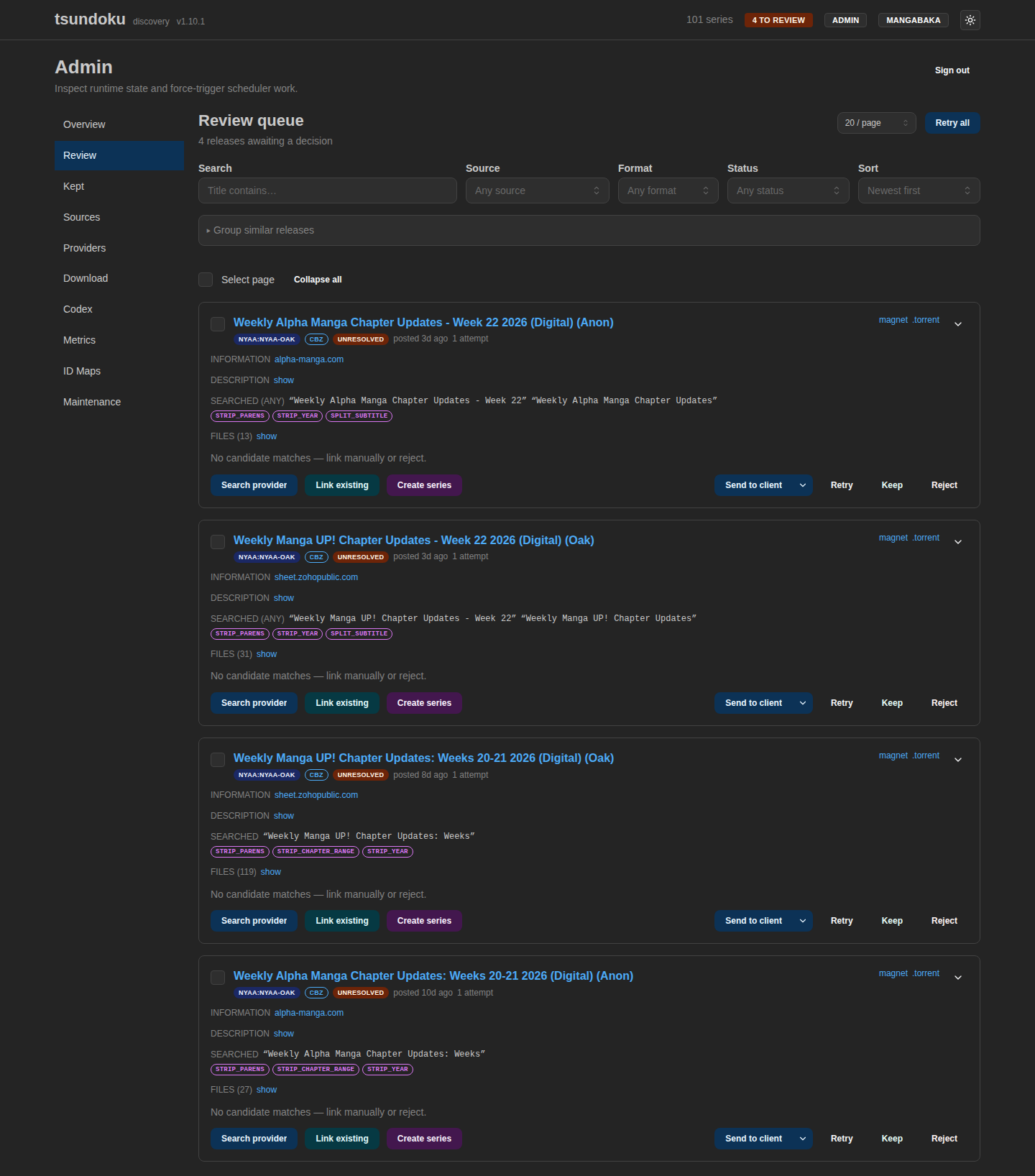
What lands here
| Status | Why it's here |
|---|---|
review_pending | Fuzzy match scored above review_threshold (0.55 default) but below resolution_threshold (0.85). Candidates persisted. |
unresolved | No candidate cleared review_threshold. No candidates persisted. |
ambiguous | A confident match was found, but its format (e.g. cbz) doesn't match the matched series's kind (e.g. novel). Linked, but flagged. |
Card anatomy
Each card shows:
- Raw title from the source — what the uploader actually posted.
searched: "..."— the cleaned primary search query the resolver used. Alternate queries (from|or/separators in the raw title) appear as chips.- Cleanup-rule badges — every rule that fired during title
cleaning:
strip_brackets,strip_parens,strip_vol_compact,strip_format,split_alternates, etc. Tells you at a glance what surgery happened. - Candidate strip — cover, canonical title, Dice score for each scored candidate. One-click "Link" buttons.
- Actions —
Search provider,Retry,Reject.
If a release auto-resolved via foreign-ID lookup, the search query and rule badges still appear — they document what the cleaner would have produced, which is useful diagnostic data for the operator and for the next person debugging a regression.
Search and filter
The queue header has a filter bar so a sudden flood doesn't bury older cards:
- Search — debounced (300 ms) substring match against the raw release title. Whitespace-only is treated as absent.
- Source — restrict to a single
[[sources]]instance by name. - Format — restrict to releases carrying one detected format
(
cbz,epub, …). Matches via therelease_formatsjoin table, so a multi-format release is included if any of its formats match. - Status — pin to one of
unresolved,ambiguous,review_pending. Any other value is ignored (the queue is always scoped to those three).
Changing any filter resets pagination and drops any in-flight bulk selection. "Clear filters" wipes all four at once.
Group similar releases
Many queue entries are the same series split across volumes,
uploaders, and formats. Rather than guessing a title substring to
cluster them, expand the Group similar releases panel above the
list: it clusters the queue by the cleaned search query stamped at
resolution time and shows each cluster as a query ×count chip
(with a muted "→ likely Title" hint when the releases share a
dominant candidate series). Only clusters with more than one member
are shown.
A breadth control tunes how aggressively query variants collapse together:
- Tight (default) — group on the primary cleaned query only.
- Medium — also match the second query variant.
- Loose — match any cleaned variant. Handy for noisy titles, but can over-group on generic fallbacks; confirm in the filtered list before acting.
Clicking a chip scopes the list to that cluster (shown as a removable Group: … badge in the filter bar) and enables the bulk actions on exactly its members — so "link/reject the whole series" is one selection away. It composes with the other filters: a title search and a group filter AND together. The grouping is ephemeral — nothing is stored, and the clusters dissolve as the queue drains.
Actions
Link a candidate
Click "Link" on any candidate card. The release transitions to
resolved with resolution_path = "manual" and the series row is
linked. The release leaves the queue.
Search provider
Opens the provider search modal:
- Title input — pre-filled with the release's cleaned primary query. Debounced 300 ms; results show as you type.
- External ID input — paste a provider ID for a direct lookup.
When set, takes priority over title — the modal short-circuits to
MetadataProvider::getand returns a single hit at score 1.0. - Result list — each hit shows cover, title, native title (if available), Dice-rescored score, and badges for year / kind / status. Click "Link" to confirm.
The modal can search any registered provider, not just the active one — useful when a series isn't in the active provider's cache but exists in a sibling provider.
Retry
Re-runs the full resolution pipeline against the release. Useful after:
- Refreshing the MangaBaka offline cache (
Refresh cacheon the Providers card ortsundoku refresh-provider-cache). - Tweaking
[ingestion.cleanup.extra_format_keywords]to handle a new uploader keyword. - Tweaking
resolution_thresholdorreview_threshold. - Adding a new format-type rule.
Reject
Marks the release as rejected and drops it from the queue. Use for
spam, off-topic content, or releases that genuinely don't have a
MangaBaka counterpart.
Keep (as standalone)
Marks a release as standalone and moves it out of the queue. Use
for worthwhile one-shots that aren't a series: a guidebook, an
artbook, a databook. Kept releases live at
/admin/kept and never re-enter resolution
unless the operator hits Re-resolve there.
Bulk operations
Tick the checkbox on multiple cards (or use Select all matching to target every release matching the current filters, not just the current page) and then Retry or Reject in bulk.
Selection semantics:
- Per-card checkboxes — the explicit set; bulk actions act on exactly these ids.
- Select all matching — overrides the per-card set. The bulk action targets every release matching the active filters, resolved server-side. Switching pages, changing a filter, or changing the search query clears the selection (a stale checkbox can't follow you into a different filtered set).
Endpoints behind the buttons:
| Action | Endpoint |
|---|---|
| Bulk retry (selected ids) | POST /releases/bulk/retry with { ids: [...] } |
| Bulk reject (selected ids) | POST /releases/bulk/reject with { ids: [...] } |
| Bulk retry (matching filter) | POST /releases/bulk/retry with { q, sourceName, format, status } |
| Bulk retry (whole queue) | POST /releases/retry-all |
Retry the whole queue. Distinct from bulk retry: retry-all
walks every queue row regardless of filter, batched server-side under
its own job lock. A concurrent retry-all (or a bulk retry that
clashes with one already in flight) reports triggered: false, skipped: true rather than starting a second batch. Use it after a
provider-cache refresh or a cleanup-rules change — see
Re-resolving after a rules change
for the broader version that also re-evaluates rows currently marked
resolved.
If a release pattern keeps flooding the queue (e.g. a new uploader
pasting a keyword the cleaner doesn't know), the durable fix is
still: add the keyword to [ingestion.cleanup.extra_format_keywords],
then bulk-retry the affected releases.
Re-resolving after a rules change
A standard retry only re-runs rows that aren't already resolved.
After tweaking format-type rules, alias dictionaries, or anything
else that could change a confident match, send resolved rows back
through the pipeline too:
# Endpoint (preferred while `serve` runs — single in-process batch).
curl -X POST -H "Authorization: Bearer $ADMIN_TOKEN" \
  "http://localhost:8080/api/v1/releases/retry-all?includeResolved=true"
# CLI (offline / one-shot).
tsundoku resolve --include-resolved
Either path skips manual links (resolution_path = 'manual') so
operator-confirmed decisions are never overwritten. With --retry-unresolved
the CLI also picks up ambiguous rows; the endpoint always does.
serve is usingThe CLI is a separate process — its job locks don't coordinate with a
running serve. Prefer the endpoint while the server is up. See the
backfill warning for the
SQLite-corruption rationale; the same risk applies here.
Auth
Review-queue endpoints are write endpoints — they always require
auth.admin_token as a Bearer token regardless of
read_requires_auth. The admin UI prompts for the token on first
load and caches it in localStorage. A "Sign out" button on the
review page clears the cached token.
If admin_token is unset in config, the server returns 503 Misconfigured (not 401) so a fresh deploy without the token
configured doesn't look like a credentialing bug.
Metrics
The admin metrics tab shows queue dynamics:
- Depth over time —
review_queue_snapshotstable, populated at minute 5 of every hour by the scheduler. - Oldest pending — age of the oldest still-pending release.
- Median time to decision — between landing in the queue and getting linked or rejected.
A flat-and-growing depth chart usually means a cleaner rule is missing or a new uploader pattern needs handling. A spiky chart that drains between spikes is healthy.